 Fellow Canadians: All inFlow plans are available in Canadian dollars




 Home
Home


My profit report shows no cost of goods sold / wrong cost of goods sold, help! (Windows)
To calculate your profit, inFlow captures your cost at the time of sale. inFlow looks at the cost in the product record’s Cost section and uses that value for profit calculations.
These two key things are important because, for example, if you had nothing entered in the Cost section when you sold your items, your profit reports will show that you sold them for $0!
This is the most common thing that affects cost reporting, so have a look at the screenshot below to see where you need to enter your product cost:
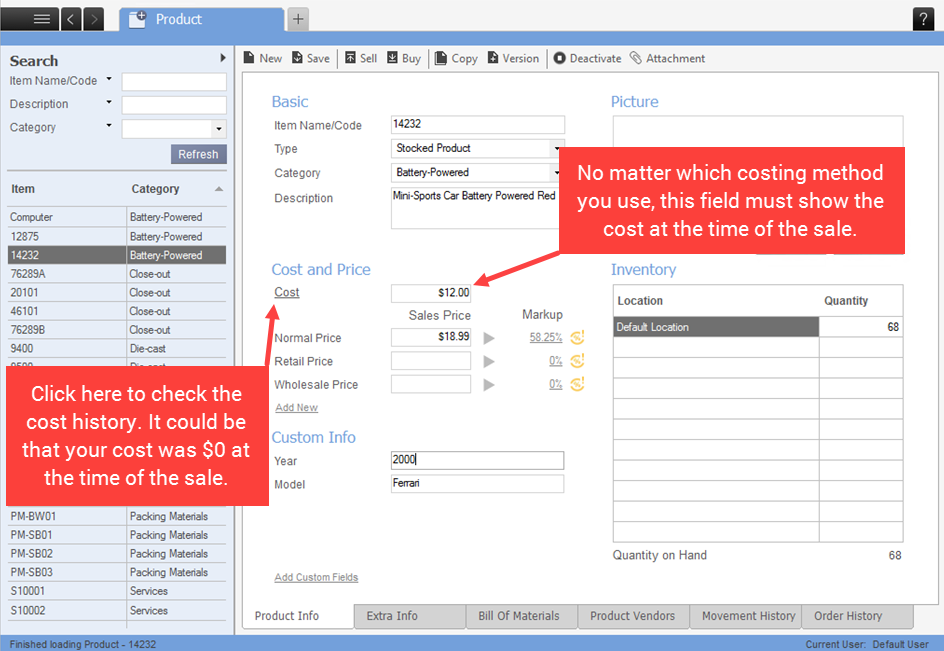
Unfortunately, if you didn’t have your cost information in the system at the time of your sale, inFlow doesn’t have the information needed to calculate your profit. This can be fixed by backdating the cost, but not all costing options use the same approach. Please see this article for how to change/backdate the cost depending on your costing options.
 Yes, thanks!
  Not really

0 Comments