 Fellow Canadians: All inFlow plans are available in Canadian dollars




 Home
Home


How do I get my inventory levels for end-of-year/ certain dates in the past?
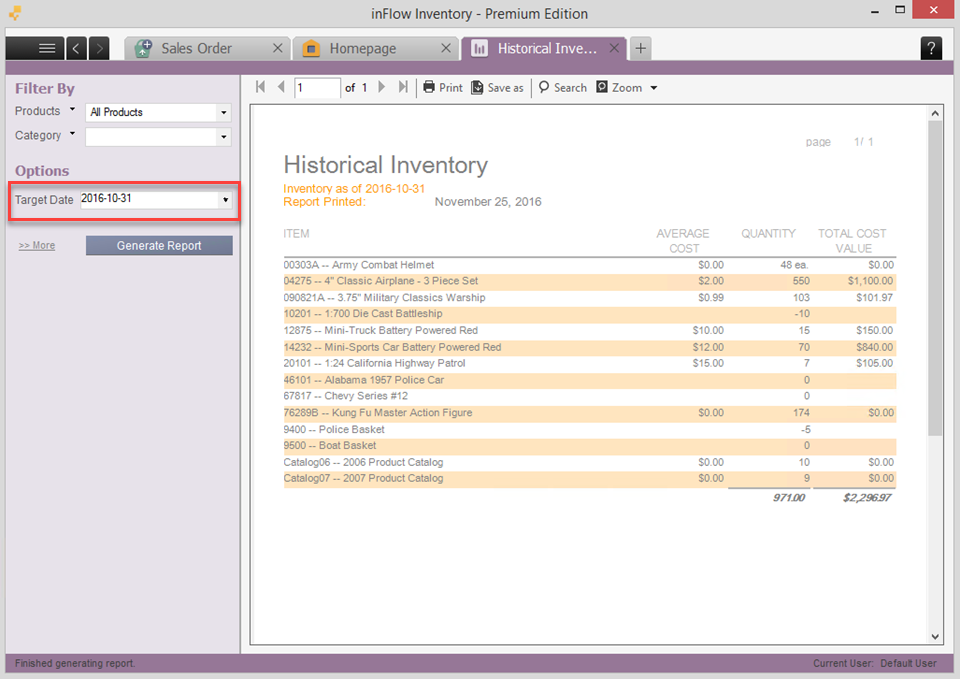
inFlow Inventory includes a Historical Inventory report that will allow you to pull the inventory levels as of the end of the day on a selected date.
Generating a historical inventory report
- Go to Main Menu > Reports > All Reports.
- Click on the Inventory Reports section.
- Select the Historical Inventory report.
- Select the date that you would like to pull and click Generate Report.
 Yes, thanks!
  Not really

0 Comments