 Fellow Canadians: All inFlow plans are available in Canadian dollars



 Home
Home


How do I cancel my inFlow account?
It’s perfectly normal to take a step back and reassess things as your business evolves! If you’re thinking about canceling your inFlow subscription, we’re here to help with any questions or concerns you might have—just reach out!
Your experience truly matters to us, and we want you to feel supported in whatever choice you make. We’re here for you!
Check in with your CSM
Before canceling, we strongly recommend you check in with your team’s Customer Success Manager (CSM).
They can help you ensure the plan you are in is the best fit for you and your business, and discuss any plan changes, including account changes, if needed.
They can also help ensure you are using inFlow to its full potential! Some things worth reviewing include:
- Do your products have barcodes? Have you considered scanners to ease daily operations?
- Do you sell on e-commerce platforms, and is your subscription linked via integration?
- Are you using Sales orders to track your products, customers, and invoices, or using only stock adjustments?
- Have you checked our reports?
- Could you benefit from additional training?
You can schedule a call with your Customer Success Manager directly from your inFlow Account Settings.

If you have considered all the points mentioned above and still think you are ready to cancel, please follow the steps below.
Canceling your inFlow plan
- With an Admin account, go to inFlow’s Account settings (Main Menu> Settings > Account)
- Click on Cancel subscription (next to Manage billing)
- Fill out the form.
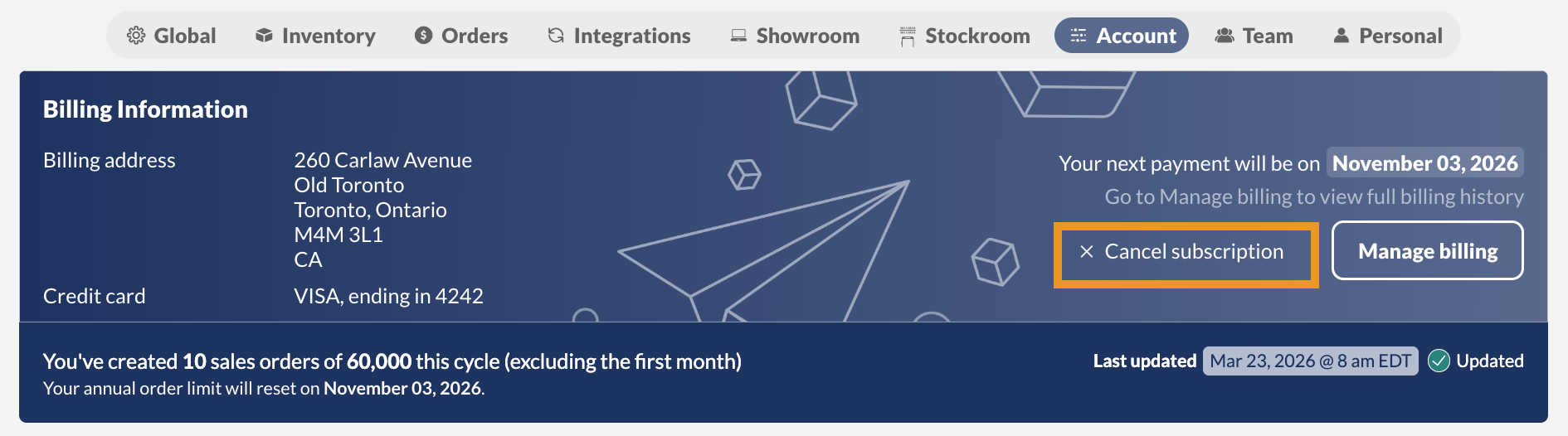
Submitting this request will stop your current billing cycle and prevent any further payments from being taken. Until this step is done, your account and subscription will remain active.
Before you go, we kindly ask that you share with us what we could have done better or why you’ve decided to cancel, so we can continue improving our software to better meet our customers’ needs.
Email cancellation requests will not be processed.
 Yes, thanks!
  Not really

0 Comments