 Fellow Canadians: All inFlow plans are available in Canadian dollars




Key takeaways
- An ERP (enterprise resource planning) system is software that connects a business’s core operations, including finance, inventory, purchasing, manufacturing, HR, and CRM, in one shared database so every department works from the same data.
- ERP costs include software licenses or subscriptions, implementation, customization, data migration, training, and ongoing support. Panorama Consulting’s 2026 ERP Report found that more than a quarter of ERP projects went over budget.
- ERP systems are usually worth it for larger or more complex businesses, such as multi-entity manufacturers, regulated industries, and companies that need finance, HR, and operations in one system.
- Most small and medium-sized businesses don’t need a full ERP system. Inventory management software connected to accounting software like QuickBooks Online or Xero covers inventory, purchasing, sales orders, and reporting at a fraction of the cost.
- The main difference between ERP and inventory management software is scope: ERP runs the whole business, while inventory software focuses on stock, orders, and fulfillment.
- Only 19% of operators use an ERP system to track inventory, while 84.8% use spreadsheets, according to inFlow’s State of Inventory Management 2026 survey of 400 operators.
Today, we’ll be talking about ERP systems (enterprise resource planning), sometimes referred to as ERP software. They’re similar to inventory management software, but there are some important distinctions. It’s generally accepted that an ERP system is “more powerful” than inventory management software, but what exactly does that mean? And more importantly, does your business actually need that power?
In this article, we’ll explain what an ERP system is, how it works, what it really costs, and how it differs from inventory management software. We’ll also answer some of the most common questions along the way, so you can decide which one fits where your business is today.
What is an ERP system?
An ERP (enterprise resource planning) system is software that connects a business’s core operations, like accounting, inventory, purchasing, manufacturing, HR, and customer management, in one shared database. Instead of each department running its own tool, everyone works from the same real-time data.
As the name suggests, an ERP system is a tool (usually ERP software) that businesses use to manage their resources. Keep in mind that in this context, “resources” refers to a lot of things, not just capital or inventory. It also covers people, equipment, time, and money.
It helps to think of an ERP system as a company’s central nervous system. On top of performing the duties of standard inventory management systems, ERP systems integrate with as many parts of a business as possible. This includes (but is not limited to) things like payroll, financial reporting, and managing customer relations.
How does an ERP system work?
An ERP system works by storing all of a company’s operational data in a single database and organizing its functions into connected modules. When something happens in one module, every other module that depends on it updates automatically.
Here’s a quick example. Say a furniture manufacturer receives a large order for dining tables:
- The sales module records the order and checks available stock.
- The inventory and manufacturing modules see that more tables need to be built, so the system checks raw materials and schedules production.
- The purchasing module flags low stock on lumber and creates a purchase order.
- The accounting module records the revenue, the cost of materials, and the payable to the supplier.
- The HR module accounts for the labor hours on the production schedule.
Nobody re-types anything, and nobody needs to switch between five different programs. That single source of truth is the whole point of ERP.
What modules does an ERP system include?
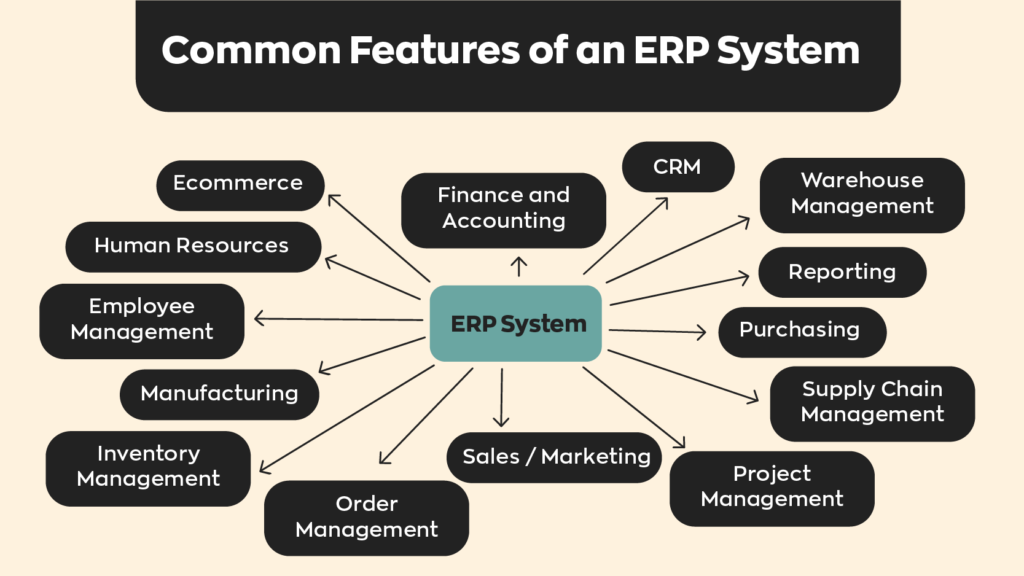
Most ERP systems are modular, meaning businesses license the modules they need and add more over time. Common ERP modules include:
- Finance and accounting
- Human resources and payroll
- Purchasing and procurement
- Manufacturing and production planning
- Inventory management
- Order management
- Warehouse management
- Employee management
- Supply chain management
- Customer relationship management (CRM)
- Project management
- Reporting and business intelligence
- Sales and marketing
- Ecommerce
A brief history of ERP
ERP’s roots go back to the 1960s, but the term itself was coined by Gartner in 1990 to describe the next generation of manufacturing software.
| Era | Milestone |
|---|---|
| 1960s | Material requirements planning (MRP) software emerges to help manufacturers plan production |
| 1980s | MRP evolves into MRP II (manufacturing resource planning), adding capacity planning and accounting |
| 1990 | Gartner coins the term “ERP” as systems expand beyond manufacturing into HR, finance, and sales |
| 2000s to today | Web-based and then cloud ERP make systems accessible from anywhere, and subscription pricing opens ERP to smaller businesses |
Given the apparent overlap between ERP and inventory management systems, some might ask: why use anything but an ERP system? There are a lot of reasons, but it all comes down to the needs of individual businesses. Let’s start with the different types of ERP out there.
What are the types of ERP systems?
ERP systems are usually grouped two ways: by how they’re deployed (cloud, on-premise, or hybrid) and by the size of business they’re built for (small business, mid-market, or enterprise).
Cloud vs. on-premise ERP
Cloud ERP is hosted by the vendor and accessed through a browser for a monthly or annual subscription. On-premise ERP is installed on a company’s own servers, which means a larger upfront license cost plus the hardware and IT staff to run it.
| Cloud ERP | On-premise ERP | |
|---|---|---|
| Hosting | Vendor’s servers | Your own servers |
| Pricing | Subscription, usually per user per month | Large upfront license plus annual maintenance |
| Upfront cost | Lower | Higher (servers, setup, IT staff) |
| Updates | Automatic, pushed by the vendor | Managed by your IT team |
| Customization | More limited | Deep, but expensive to maintain |
| Best for | Most growing businesses | Companies with strict data-control or legacy requirements |
A hybrid setup mixes the two, for example keeping financials on-premise while running ecommerce or CRM modules in the cloud.
Small business vs. mid-market vs. enterprise ERP
Not every ERP is built for a Fortune 500 company. Vendors generally target one of three tiers:
- Small business ERP: Simpler, often modular systems with published per-user pricing and lighter implementation. Think Odoo or Microsoft Dynamics 365 Business Central’s Essentials tier.
- Mid-market ERP: Built for companies that have outgrown basic accounting software, often with multiple locations, entities, or currencies. Oracle NetSuite, Acumatica, and Business Central are common picks here.
- Enterprise ERP: Global, multi-subsidiary platforms with deep customization and long implementations, such as SAP S/4HANA and Oracle Fusion Cloud ERP.
The tiers overlap, and many vendors sell into more than one. The bigger the tier, the more you’ll typically pay for implementation and partner support on top of the software itself.
What are some examples of ERP systems?
The most widely used ERP systems include SAP S/4HANA, Oracle NetSuite, Microsoft Dynamics 365 Business Central, Acumatica, Odoo, Epicor Kinetic, and Infor CloudSuite Industrial. Here’s how they generally line up (as of October 2026):
| ERP system | Typical fit | Deployment | Public pricing? |
|---|---|---|---|
| SAP S/4HANA | Large, global enterprises | Cloud or on-premise | No, quote-based |
| Oracle NetSuite | Mid-market, fast-growing companies | Cloud only | No, quote-based |
| Microsoft Dynamics 365 Business Central | Small and mid-sized businesses | Cloud or on-premise | Yes, $80 to $110 per user per month |
| Acumatica | Mid-market distribution and manufacturing | Cloud or private cloud | No, quote-based |
| Odoo | Small businesses wanting modular apps | Cloud or self-hosted | Yes, per user |
| Epicor Kinetic | Mid-sized manufacturers | Cloud or on-premise | No, quote-based |
| Infor CloudSuite Industrial | Discrete and process manufacturers | Cloud | No, quote-based |
Keep in mind that a published subscription price is only the starting point. Implementation, partner fees, and add-on modules usually cost more than the licenses in year one.
How much does an ERP system cost?
An ERP system typically costs tens to hundreds of thousands of dollars once software, implementation, and training are added up. Panorama Consulting’s ERP benchmark research has put the median ERP project cost at around $450,000, and some estimates put ERP costs for mid-sized businesses anywhere between $150,000 and $750,000 annually. Larger businesses may need to pay even more.
The bottom line is that not every business needs the amount of raw power that an ERP system offers. These systems are designed to be an all-in-one solution for issues that large businesses face on a day-to-day basis. There’s some overlap, but generally speaking, smaller businesses don’t really face the same issues. And at those prices, enterprise resource planning software is often prohibitively expensive for them.
Even the “affordable” end of the market adds up. Microsoft Dynamics 365 Business Central, one of the most popular small business ERPs, lists at $80 per user per month for its Essentials plan and $110 for Premium (Premium is the tier that adds manufacturing). For a 15-person team on Premium, that’s $19,800 a year in licenses alone, before a single hour of implementation.
And it’s not just a big-company problem. One wholesaler we spoke with in 2026, moving about $1.4 million in product a year, was quoted roughly $90,000 per year for an ERP. That’s the kind of number that sends a lot of growing businesses looking for alternatives.
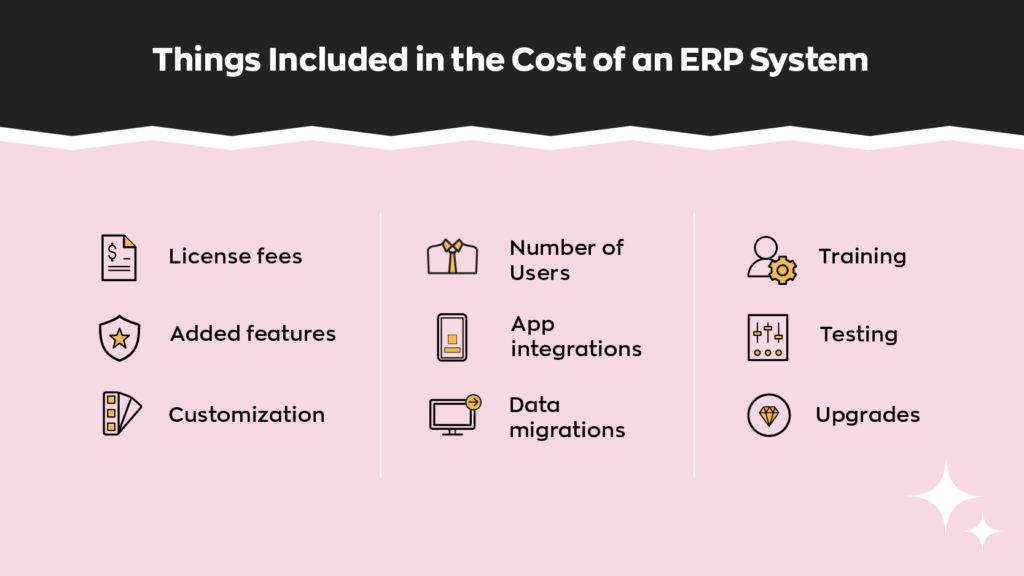
What’s included in the cost of an ERP system?
The software is only one line on the bill. There are also maintenance and implementation costs to consider. You may need new servers (for on-premise systems), more IT people, consultants, and even tech training experts, all of which cost money.
| Cost component | What it covers |
|---|---|
| License or subscription fees | The software itself, usually priced per user |
| Added features and modules | Manufacturing, HR, CRM, or industry-specific add-ons |
| Customization | Tailoring workflows, fields, and reports to your processes |
| Number of users | Costs scale with every full or limited user seat |
| App integrations | Connecting ecommerce, shipping, banking, and other tools |
| Data migration | Cleaning and moving data out of your old systems |
| Training | Getting every department comfortable in the new system |
| Testing | Running the new system in parallel before go-live |
| Upgrades and support | Ongoing maintenance, partner support, and version upgrades |
That sounds like a lot (and it is), but there’s a good reason for it. The all-encompassing nature of ERP systems means that they save businesses time (and by extension, money) by reducing manual labor.
By reducing the amount of necessary menial work, businesses save money in the long run. Instead of spending hours filing paperwork or re-entering data each week, employees can use that time to complete other, more important tasks.
How long does ERP implementation take?
Most ERP implementations take several months to more than a year. Panorama Consulting’s 2026 ERP Report puts the median project at about nine months, with timelines driven more by scope than by company size.
Budgets slip, too. In the same report, more than a quarter of organizations went over budget, and the most common reason was an unexpected need for additional technology. In other words, companies discovered partway through that the system they picked didn’t cover everything they thought it would.
What are the pros and cons of an ERP system?
The biggest advantage of an ERP system is that it connects the whole business in one place. The biggest drawbacks are cost, complexity, and how long it takes to see a return.
| Pros of an ERP system | Cons of an ERP system |
|---|---|
| Long-term reduction in operational costs | Expensive to license, implement, and maintain |
| Increased efficiency and less manual data entry | Time-consuming implementation |
| High data security and centralized access controls | No immediate results; ROI can take years |
| Integrates all aspects of the business | Overly complex for simpler operations |
| Standardizes processes across departments and locations | Requires extensive training |
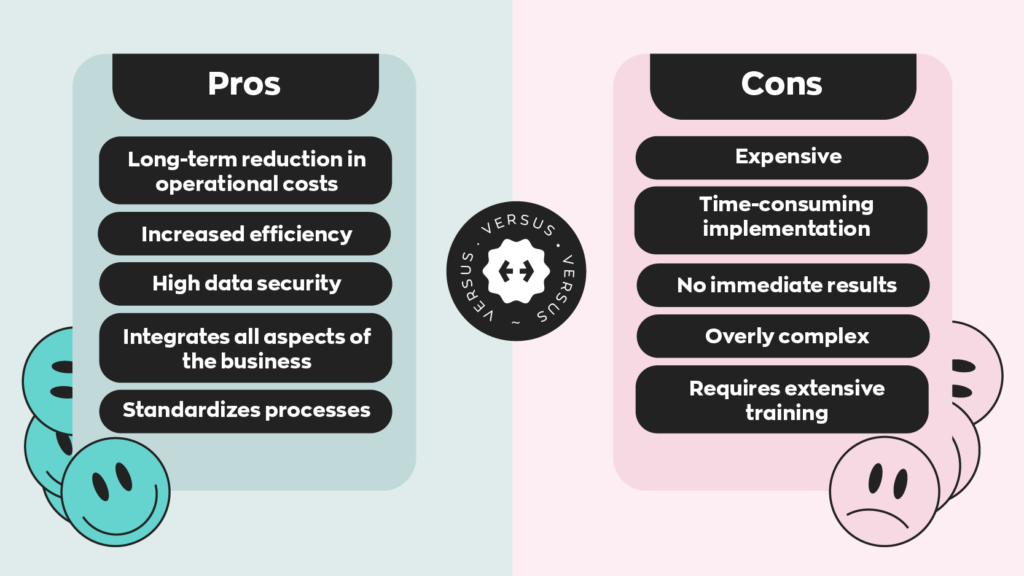
Those cons line up almost exactly with what operators told us is holding them back from new technology. In inFlow’s State of Inventory Management 2026 survey of 400 operators, the top implementation concerns were cost (62%), integration with existing systems (52.2%), and staff training (50.5%). ROI uncertainty came dead last at 21.5%. In other words, most businesses believe the technology works. They just aren’t sure they can afford it, connect it, or get their team to use it.
ERP vs. inventory management software: what’s the difference?
The main difference between ERP and inventory management software is scope. An ERP system runs the entire business, from payroll to the general ledger, while inventory management software focuses on stock, orders, purchasing, and fulfillment, and connects to separate tools for accounting and everything else.
| ERP system | Inventory management software | |
|---|---|---|
| Scope | Whole business: finance, HR, CRM, supply chain, inventory | Inventory, sales orders, purchasing, fulfillment, and reporting |
| Typical user | Mid-market and enterprise companies | Small and medium-sized businesses |
| Accounting | Built in | Connects to accounting software like QuickBooks Online or Xero |
| Typical cost | Per-user licenses plus implementation that often runs into six figures | Monthly subscription; inFlow plans start at $99 per month, billed annually |
| Implementation time | Months; Panorama’s median is about nine | Often days to a few weeks |
| Flexibility | Rigid, standardized processes | Easier to adapt and swap tools around |
| Training | Extensive, across every department | Lighter, focused on operations staff |
Does ERP software include inventory management?
Yes. Almost every ERP system includes an inventory management module that tracks stock levels, locations, and movements. The depth varies a lot, though. Some ERPs offer basic stock tracking, and businesses with complex warehouses often add a dedicated inventory or warehouse management system on top.
The reverse isn’t true. Inventory management software doesn’t include payroll, HR, or a full general ledger. It handles operations and hands the financial side to your accounting software.
ERP vs. MRP
MRP (material requirements planning) software calculates which raw materials a manufacturer needs, how many, and when, based on production schedules and bills of materials. ERP grew out of MRP and still usually includes it as a module, alongside finance, HR, and sales.
If production planning is your main headache, an MRP system (or inventory software with manufacturing features) may be all you need. Manufacturers who need real-time control of the shop floor might also look at a manufacturing execution system (MES).
For a bit more context on what an MRP is, checkout a clip from our podcast below.
ERP vs. accounting software
Accounting software like QuickBooks Online and Xero is not an ERP. It manages the books: invoices, bills, payroll (in some plans), and financial reports. It has limited inventory features, which is why many growing businesses pair it with dedicated inventory software rather than jumping to a full ERP.
If you’re weighing the two most popular options, our QuickBooks Online vs. Xero comparison breaks down the differences, and our guide to inventory accounting covers how stock shows up on your books.
Who needs an ERP system?
Businesses that truly need an ERP system generally fall into a few categories. They’ve either outgrown typical inventory management software and need something more inclusive, or they have a lot more variables to deal with. Think of it like this:
Businesses that focus on selling products only need to worry about a few things, like managing inventory and tracking sales.
On the other hand, businesses that buy raw materials and manufacture products in-house have more to keep track of. They need to track input and output, and they probably manage many different types of workers.
It’s possible to handle all these different variables with separate systems, but this could create more work instead of less. Employees would need to switch between interfaces frequently, and these different systems might not even be compatible with one another. That switching adds up fast: researchers writing in Harvard Business Review found workers toggled between apps and websites nearly 1,200 times a day, costing just under four hours a week, or about 9% of their working time.
For big businesses that deal with a lot of different variables, implementing an ERP system saves them money. But size alone doesn’t decide it. In our State of Inventory Management 2026 survey, only 19% of operators used an ERP system to track inventory, and 53% of companies with 500 or more employees still relied primarily on spreadsheets.
Which industries use ERP systems the most?
Certain industries gravitate toward ERP systems more than others because they juggle more variables, more regulation, or more entities. Examples include:
- Manufacturing, especially automotive: Multi-level bills of materials, production scheduling, and supplier networks across many plants.
- Healthcare: Strict compliance and audit requirements, plus supply, staffing, and billing that all need to tie together.
- Industrial construction: Large, multi-year projects with job costing, equipment, and subcontractors spread across sites.
- Wholesale and distribution at scale: Many warehouses, currencies, and trading partners connected through EDI.
That said, plenty of businesses in those same industries run perfectly well without one. In our survey, 81% of construction and trades operators managed inventory with no dedicated software at all, let alone an ERP.
Signs your business has outgrown inventory software
You might be ready for an ERP system if several of these sound familiar:
- You operate multiple legal entities and need consolidated financial reporting
- You manage HR, payroll, and operations for a large workforce and want them in one system
- You need advanced production planning, like capacity planning across several plants
- You face regulatory requirements that demand a single, auditable system of record
- You have dozens of users across departments who all need the same real-time data
- Your integrations between separate tools break often enough that keeping them in sync is a job of its own
If only one or two apply, you probably haven’t outgrown a well-connected inventory and accounting setup yet.
Does a small business need an ERP system?
Most small businesses don’t need an ERP system. Inventory management software connected to accounting software usually covers what they need for a fraction of the cost and implementation time.
Generally speaking, smaller businesses operate on a much smaller scale. They usually have fewer employees and fewer departments, meaning that bookkeeping and coordination aren’t anywhere near as time-consuming. As a result, implementing (and renewing) ERP software costs them money in the long run. And considering the price tag, quite a bit of it.
Even putting aside the money part of the equation, there are other reasons that small businesses should stick to inventory management software.
First, because ERP systems affect business processes on a large scale, they can be difficult to implement. On top of that, they pose a bit of a learning curve. These two factors together can affect short-term performance, and if not kept in check, can cause long-lasting damage.
Second, it takes time for an ERP system to do its job. Sometimes it takes years for businesses to see significant returns on their investment. Larger businesses might be able to stomach the cost for some time, but smaller businesses usually can’t.
We hear this regularly from businesses moving off ERPs like NetSuite, Odoo, and Acumatica. The reasons are almost always the same: too expensive, too complex, or too much system for what they actually do.
How inventory management software covers ERP-style needs
Inventory management software, on the other hand, is relatively inexpensive. Most cost a few hundred dollars per month or less, a fraction of the cost of ERP systems. inFlow Inventory plans start at $99 per month, billed annually.
Not to mention many of these systems, including inFlow, are meant to perform a lot of the same operational functions as ERP software. For example:
- Real-time inventory tracking across multiple locations
- Sales orders, purchase orders, and invoicing
- Barcoding for receiving, picking, and counting
- Reorder points and low-stock alerts
- Inventory, sales, and purchasing reports
- Creating bills of materials (BOMs) and manufacture orders (with inFlow Manufacturing, which starts at $169 per month, billed annually)
The piece inventory software leaves out, the general ledger, is handled by your accounting software. inFlow syncs with QuickBooks Online and Xero, so sales become invoices, received purchase orders become bills, and inventory value flows to your books without anyone entering it twice. (If you’re already on Xero, here’s how Xero’s own inventory management compares.)
As a result, inventory and warehouse management software strikes a balance of affordability and usability that most SMBs can’t get from an ERP.
Why flexibility matters for growing businesses
Another thing to consider is the rigidity of an ERP system. They’re meant to be all-inclusive systems that handle as many parts of a business as possible.
As a result, ERP systems both process and produce massive amounts of data, ranging from customer information to sales reports. Because everything is tied together, changing one process can ripple through the whole system, so there’s less room for quick customization or flexibility.
Integrating an ERP system into an already-existing business can be time-consuming and expensive. On top of this, many businesses don’t see the full benefits of an ERP system until years later.
Inventory management software isn’t as cost-prohibitive, and it comes with most of the features SMBs need. As we mentioned, things like barcodes, purchase and sales orders, and reorder points are all common fare when it comes to inventory management software. And systems like inFlow even have integrations with over 95 different platforms. So you can connect software like QuickBooks Online, Shopify, and more directly to the software, and swap tools in or out as your business changes.
How to choose between ERP and inventory management software
Choose an ERP system when you need finance, HR, and operations running in one database across multiple entities or departments. Choose inventory management software, connected to your accounting software, when your main challenges are stock, orders, and purchasing.
Considering the continued growth of retail and ecommerce, with eMarketer forecasting global retail ecommerce sales of $6.88 trillion in 2026 (up 7.2% from 2025), the need for both will only increase. The ERP software market alone is projected to reach $106.22 billion in 2026. But every business has different needs, and considering how much an ERP system costs, choosing the wrong one, even briefly, often leads to larger issues. Before you sign anything, ask yourself:
- What problem am I actually solving? Stock accuracy, reordering, and fulfillment call for better inventory management, not necessarily an ERP.
- How many departments need the same data in real time? One or two usually means connected tools will do.
- What’s my total budget for year one? Include implementation, training, and integrations, not just the subscription.
If you’re not there yet, the good news is you don’t have to be. You can try inFlow for free and see how far a connected inventory system takes you.ws is you don’t have to be. You can try inFlow for free and see how far a connected inventory system takes you.
FAQ
What are some common examples of ERP systems?
Common ERP systems include SAP S/4HANA and Oracle Fusion Cloud ERP for large enterprises, Oracle NetSuite and Acumatica for mid-market companies, and Microsoft Dynamics 365 Business Central and Odoo for small and mid-sized businesses. Manufacturing-focused options include Epicor Kinetic and Infor CloudSuite Industrial. Each targets a different company size, so the right fit depends on your complexity and budget.
What are the different types of ERP software?
ERP software is usually grouped by deployment and by business size. By deployment, there’s cloud ERP (hosted by the vendor, paid by subscription), on-premise ERP (installed on your own servers), and hybrid setups. By size, there are small business, mid-market, and enterprise ERPs. Some vendors also build industry-specific ERPs for manufacturing, construction, or distribution.
What features should I look for in an ERP for a small business?
Look for integrated accounting, inventory management, purchasing, sales orders, and reporting first, since those are the core of most small business operations. Beyond that, prioritize ease of use, published pricing, a short implementation timeline, and integrations with the tools you already use, like your ecommerce platform. If you manufacture, check for bills of materials and production tracking.
How does a small business ERP compare to an enterprise ERP?
Small business ERPs are simpler, cheaper, and faster to implement, usually with per-user subscription pricing and standard workflows. Enterprise ERPs support global operations, multiple subsidiaries, and deep customization, but they come with longer implementations, partner-led setup, and significantly higher total cost of ownership. The goal is the same: connecting finance and operations in one system.
What are common mistakes to avoid when selecting an ERP system?
The most common mistakes are choosing based on feature lists instead of your actual workflows, budgeting only for licenses, and underestimating data migration and training. Panorama Consulting’s 2026 ERP Report found the leading cause of budget overruns was an unexpected need for additional technology, which usually points to a poor fit discovered too late. Map your processes before you shop.
Are ERP systems worth it for small businesses?
ERP systems are usually not worth it for small businesses with simple operations, because implementation, licensing, and training costs outweigh the benefits. They become worth it when a business runs multiple entities, needs HR and finance tightly tied to operations, or has outgrown connected tools. Most small businesses get better value from inventory software paired with accounting software.
What software can small businesses use instead of an ERP?
Most small businesses can replace an ERP with inventory management software connected to accounting software. For example, inFlow handles inventory, purchasing, sales orders, barcoding, and reporting, and syncs with QuickBooks Online or Xero for the books. It also connects to Shopify, Amazon, and 95+ other platforms, so you get ERP-style connectivity without an ERP-sized price tag.
0 Comments