 Fellow Canadians: All inFlow plans are available in Canadian dollars





Key takeaways
- Using spreadsheets for inventory becomes a liability when the time spent fixing errors and reconciling inventory costs more than dedicated inventory software.
- Frequent stockouts, overstocking, data-entry mistakes, and a lack of real-time inventory visibility are some of the clearest signs that spreadsheets can no longer support a growing business.
- Operational complexity, like multiple locations, reliance on one “spreadsheet expert,” manual reorder calculations, or new sales channels, often signals it’s time to move beyond spreadsheets.
- Inventory software automates stock updates, reorder alerts, reporting, and accounting and shipping integrations, reducing manual work while improving accuracy and scalability.
You’ve outgrown spreadsheets for inventory when manual updates cause frequent stockouts and errors start spreading across your sales channels. If three or more of the nine signs below sound familiar, dedicated inventory software will likely save you more than it costs.
Growing companies often reach a point where spreadsheets can no longer keep up with real-time inventory demands, multi-channel sales, and accurate forecasting. The signs below show when you’ve crossed that line.
What does “outgrowing spreadsheets” actually mean?
Outgrowing spreadsheets means the time and money lost to manual tracking and reconciliation now exceeds what dedicated software would cost. Spreadsheets rarely fail all at once. The breaking point usually shows up as a pattern rather than a single disaster.
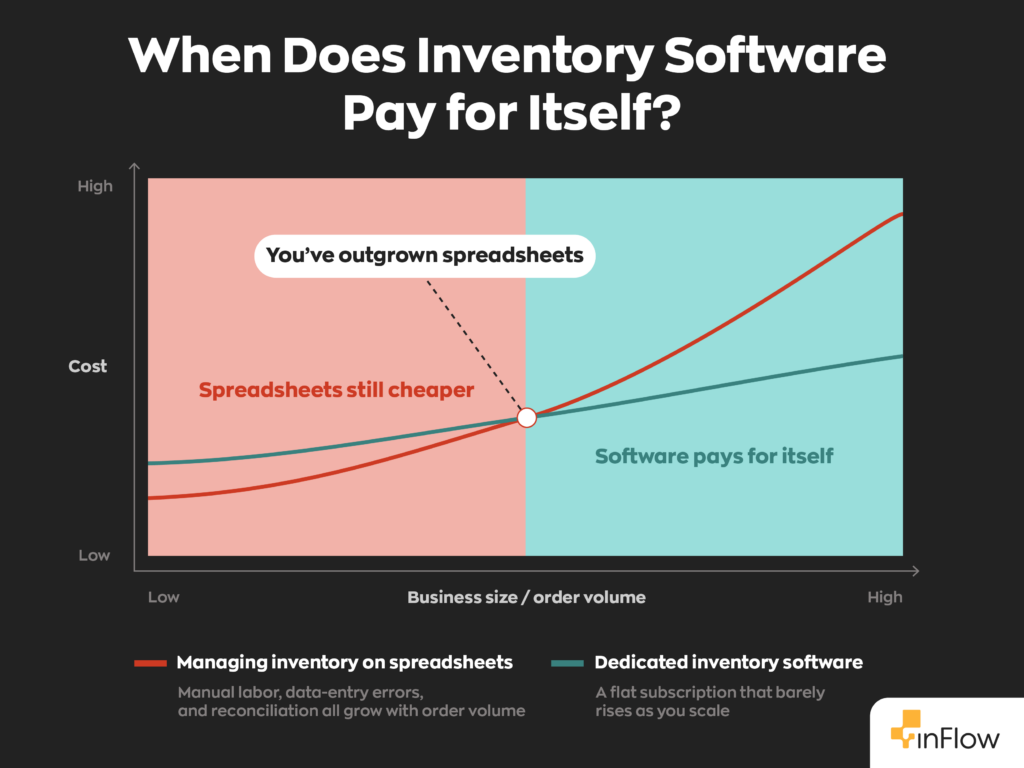
The risk is well documented. A 2024 literature review in Frontiers of Computer Science, later summarized by Phys.org, notes earlier studies finding that about 94% of audited spreadsheets in use contained errors. Those errors can lead to financial losses, pricing mistakes, and operational problems. For inventory specifically, one mistyped figure can throw off purchasing decisions for weeks.
The 9 Signs You’ve Outgrown Spreadsheets for Inventory
The more of these that apply, the stronger the case for switching.
| # | Sign | What it costs you |
| 1 | Frequent stockouts and overstocking | Lost sales, tied-up cash |
| 2 | Constant data-entry errors | Bad purchasing decisions |
| 3 | No real-time visibility | Overselling, customer complaints |
| 4 | Multi-location confusion | Conflicting file versions |
| 5 | “Key person” dependency | Operational risk if they leave |
| 6 | Manual reorder calculations | Missed orders, emergency buys |
| 7 | No historical traceability | Compliance and recall exposure |
| 8 | Difficulty adding sales channels | Growth creates more manual work |
| 9 | Reporting takes hours | Slow, late decisions |
1. You face frequent stockouts and overstocking
Stock counts lose accuracy fast when updates depend on manual entry. One missed shipment or unrecorded sale throws the count off. Some businesses face stockouts of products the spreadsheet said were in stock; others over-order and tie up cash in slow-moving items.
2. Data-entry errors are constant
A single extra zero or a broken formula can distort purchasing for weeks. Spreadsheets lack the barcode-scanning workflows many inventory systems provide, so every keystroke is an opportunity for error. When you find yourself routinely double-checking the sheet against the shelf, the sheet has stopped doing its job.
3. You lack real-time visibility
Real-time accuracy matters the moment order volume climbs. If inventory only updates when someone keys it in at day’s end, every hour in between is a guess. That gap is where overselling happens, such as selling a product that sold out three orders ago.
4. Multi-location tracking has become chaos
Managing stock across warehouses, retail locations, and delivery vehicles in separate spreadsheets creates competing versions of the same file. Two team members editing two copies produce two different answers, and no one knows which is correct.
5. One person is the only one who understands the system
Many small businesses run inventory on a spreadsheet only one employee fully understands. If that person is out sick or leaves, tracking can fall apart overnight. Depending on a single “key person” leaves the whole operation exposed.
6. You calculate reorder points by hand
Checking stock levels manually to decide what to reorder is slow and easy to skip on a busy day. Skip it once and you’re placing an emergency order at a premium. Automated reorder alerts remove the guesswork and the rush fees.
7. You have zero historical traceability
For businesses in regulated sectors that must track lot numbers, batches, or expiration dates struggle to do so in spreadsheets. Missing or overwritten records create real compliance and product-recall exposure. You can’t trace what you never logged.
8. Adding sales channels creates more work, not more growth
Expanding to a new marketplace should drive growth, not multiply manual updates. When every new channel means another spreadsheet to reconcile by hand, the tool is now capping your growth instead of supporting it.
9. Reporting feels like a chore
Reports exist to speed up decisions. If pulling a sales or stock-movement report takes hours of copying and reformatting, your process is delaying the decisions it should be speeding up. Dedicated tools generate inventory and sales reports on demand, so the numbers are ready when you need them.
Do I need inventory software? A simple decision test
If three or more of the nine signs above apply to your operation today, the answer is almost certainly yes. Here’s how to confirm it:
- Run a quick audit. Count one fast-moving product physically, then compare it to your spreadsheet. A meaningful gap is the clearest signal of all.
- Estimate the hidden cost. Add up the hours your team spends each week updating, correcting, and reconciling files, then multiply by their hourly cost. Spreadsheets feel free; the labor isn’t.
- Weigh it against software. If that weekly labor cost approaches or exceeds a software subscription, before counting the cost of stockouts and errors, switching pays for itself.
How inventory software closes each gap
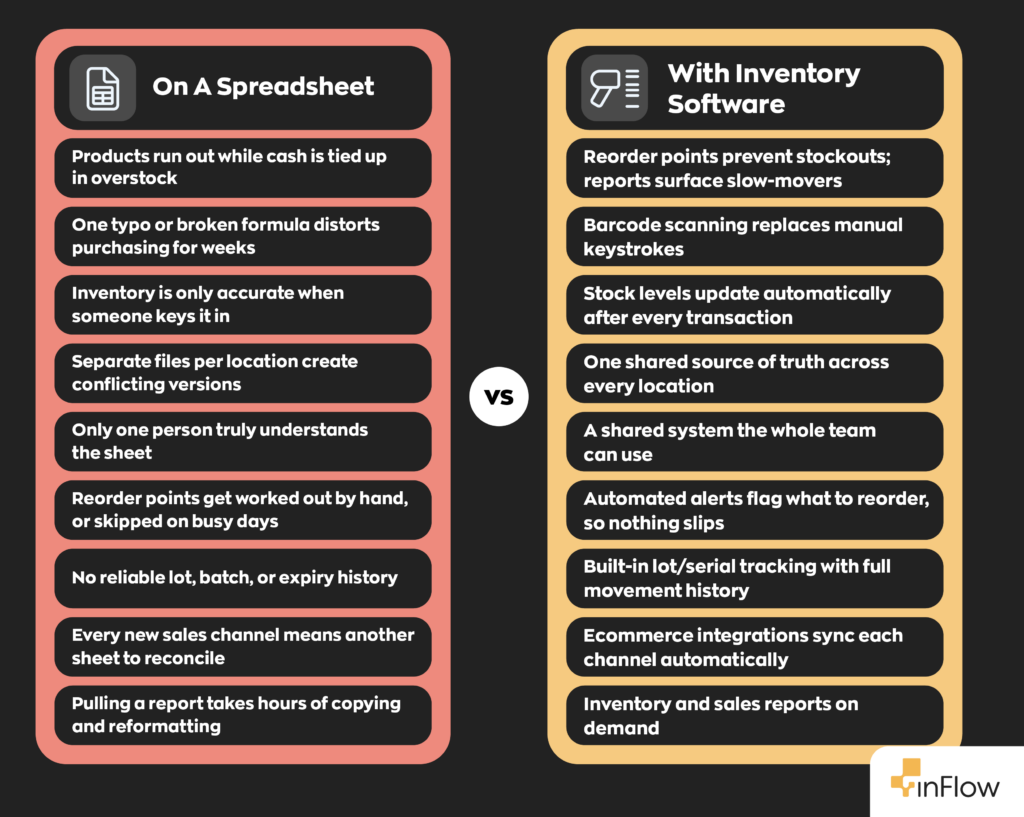
Dedicated inventory software replaces manual entry with automatic updates after every sale, return, or shipment. That single change addresses most of the nine signs at once:
- Stock counts stay current without anyone keying them in
- Reorder alerts fire automatically when levels drop
- Errors from manual entry largely disappear
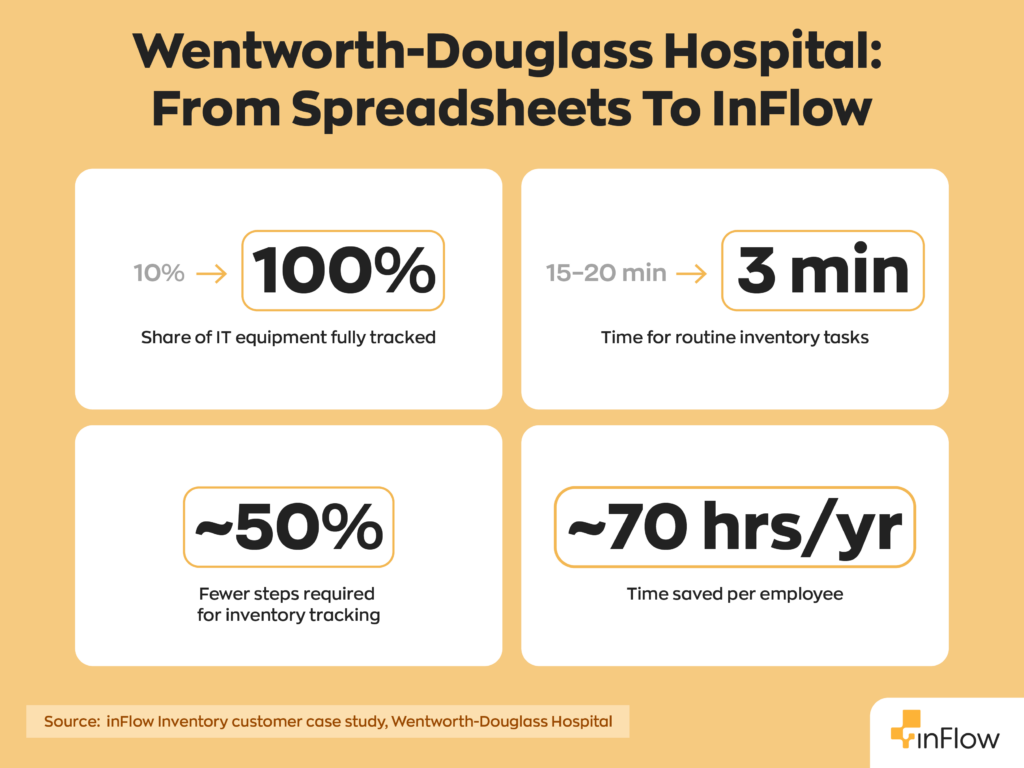
The results can be dramatic. When Wentworth-Douglass Hospital’s IT team ran inventory on Excel and FileMaker, they could fully track only 10% of their equipment. After moving to inFlow, tracking reached 100% and routine tasks that took 15–20 minutes dropped to three.
The second advantage is integration. Inventory tools connect to accounting and shipping platforms, so sales can flow into QuickBooks Online, while shipping and fulfillment workflows connect through inFlow’s supported ecommerce and shipping carrier integrations. Connected systems reduce errors and save hours each week as channels grow.
If several of these signs already describe your daily operations, a dedicated system will likely save time and money faster than expected. You can see how an automated workflow compares to your current spreadsheet by taking the inFlow Inventory tour.
Reviewed by the inFlow Inventory team. inFlow has helped small and mid-sized businesses move off spreadsheets and onto connected inventory management since 2007.
FAQ
How do I know if my business has outgrown spreadsheets for inventory?
If you’re dealing with frequent stockouts, constant data-entry errors, or reports that take hours to pull together, that’s your answer. Run a quick test: count one fast-moving product by hand and compare it to your spreadsheet. If the numbers don’t match (and they usually don’t), you’ve already outgrown it.
How do I keep accurate inventory records without switching software?
Honestly, it’s tough. You can improve accuracy with strict update rules (record every sale and shipment the moment it happens), locked formulas, and a single “source of truth” file everyone edits. It helps, but it won’t eliminate human error. Most businesses find the real fix isn’t a better spreadsheet habit; it’s removing manual entry altogether.
Can I still use a spreadsheet for reselling inventory?
For a handful of SKUs and one sales channel, sure. But reselling often means juggling multiple marketplaces, shifting costs, and fast-moving stock, which is where spreadsheets fall apart fastest.
What are the benefits of inventory management software over spreadsheets?
The biggest wins are automatic updates, real-time visibility, and reorder alerts that fire before you run out of stock, not after. You also get built-in traceability, multi-location tracking, and reporting that takes seconds instead of hours. In short: everything spreadsheets require you to do manually, software just…does.
How does inventory data integrate with other business tools?
Dedicated inventory software connects directly to accounting platforms (like QuickBooks Online and Xero) and ecommerce or shipping tools, so a sale automatically updates your stock count, your books, and your fulfillment workflow.
What’s the best inventory software for a small business outgrowing spreadsheets?
The right fit depends on your sales channels, team size, and whether you need multi-location tracking. Look for real-time updates, barcode scanning, automated reorder points, and integrations with your existing accounting and ecommerce tools. inFlow covers all of that, and it offers a free trail so you can see how it stacks up against your current spreadsheet.
0 Comments