 Fellow Canadians: All inFlow plans are available in Canadian dollars





Key takeaways
- When deciding between QuickBooks Online vs Xero, consider factors such as pricing, user access, integrations, and ease of use.
- Both platforms offer similar core features, such as invoicing, bank reconciliation, and multi-currency support.
- Xero allows unlimited users on all plans, whereas QuickBooks Online limits users based on your subscription level.
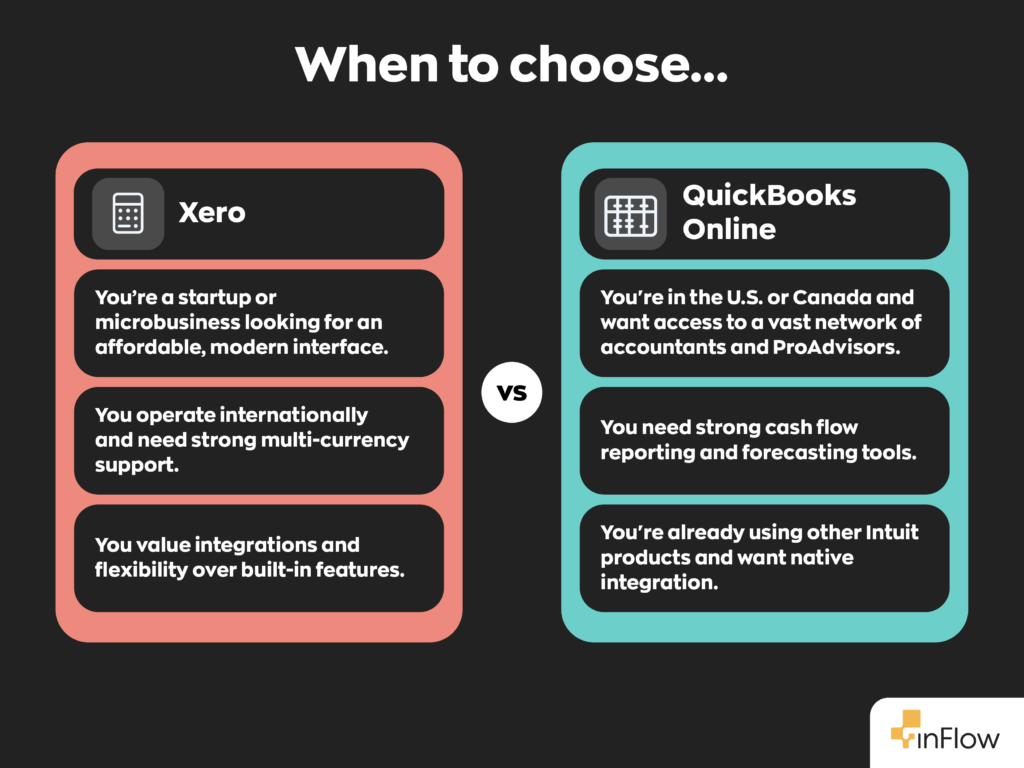
- QuickBooks Online offers more advanced reporting and cash flow forecasting tools, while Xero is known for its intuitive interface and extensive app marketplace.
- Neither solution is ideal for complex inventory management; both offer only basic inventory-tracking capabilities.
- inFlow integrates with both platforms, allowing businesses to choose the accounting software that fits them best while still managing inventory effectively.
QuickBooks Online has become synonymous with accounting for years now. It’s dominated the small business world and cemented itself as the go-to business accounting software, and for good reason. QuickBooks Online is a powerful tool that integrates with a variety of other software solutions.
However, it’s not your only option.
Over the past few years, one particular name that’s been growing in popularity is Xero accounting software. It’s quickly become a sought-after alternative to QuickBooks Online—especially in regions outside of North America. With its modern interface, flexible pricing, and robust feature set, Xero has positioned itself as a serious contender.
But when it comes to QuickBooks Online vs Xero, which one is right for your business? Let’s find out.
What is Xero?
Xero is a cloud-based accounting software built with SMBs in mind. It offers tools for invoicing, bill payments, expense tracking, and more. It was first launched in 2006 in New Zealand and has since risen to become one of QuickBooks Online’s top competitors.
Xero has a strong international user base, particularly in the UK, Australia, and New Zealand. In recent years, its user base has also begun to grow in North America.
Key features of Xero
Xero packs a lot into its cloud-based platform, making it a great QuickBooks Online alternative for businesses that want simplicity without sacrificing functionality. Here are some of its standout features.
- Real-time bank feeds and reconciliation
- Customizable invoicing and billing
- Payroll (varies by region)
- Built-in time tracking (with higher-tier plans)
- Expense and project tracking
- Multi-currency support (with Established plan)
- Integration with over 1,000 third-party apps
Xero’s features make it a great choice for small to medium-sized businesses that want flexible, cloud-based accounting packed into a user-friendly package. But how does it compare to QuickBooks Online? Let’s take a closer look.
Key features of QuickBooks Online
As we mentioned before, QuickBooks Online’s reputation precedes it. It’s Intuit’s flagship cloud-based accounting software and the go-to choice for many U.S. businesses. It has a myriad of features that accountants love. Here are some of the most notable ones.
- Bank feeds and smart reconciliation
- Customizable invoices and recurring billing
- Payroll add-ons available
- Mileage and time tracking
- Cash flow forecasting and reporting
- Multi-currency support
- Over 800 app integrations
QuickBooks Online continues to be a leading choice for SMBs, especially in North America, thanks to its robust feature set and broad adoption across the accounting community. However, just because something is the popular choice doesn’t mean it’s the best fit for everyone. Let’s compare Xero vs QuickBooks Online.
QuickBooks Online vs Xero
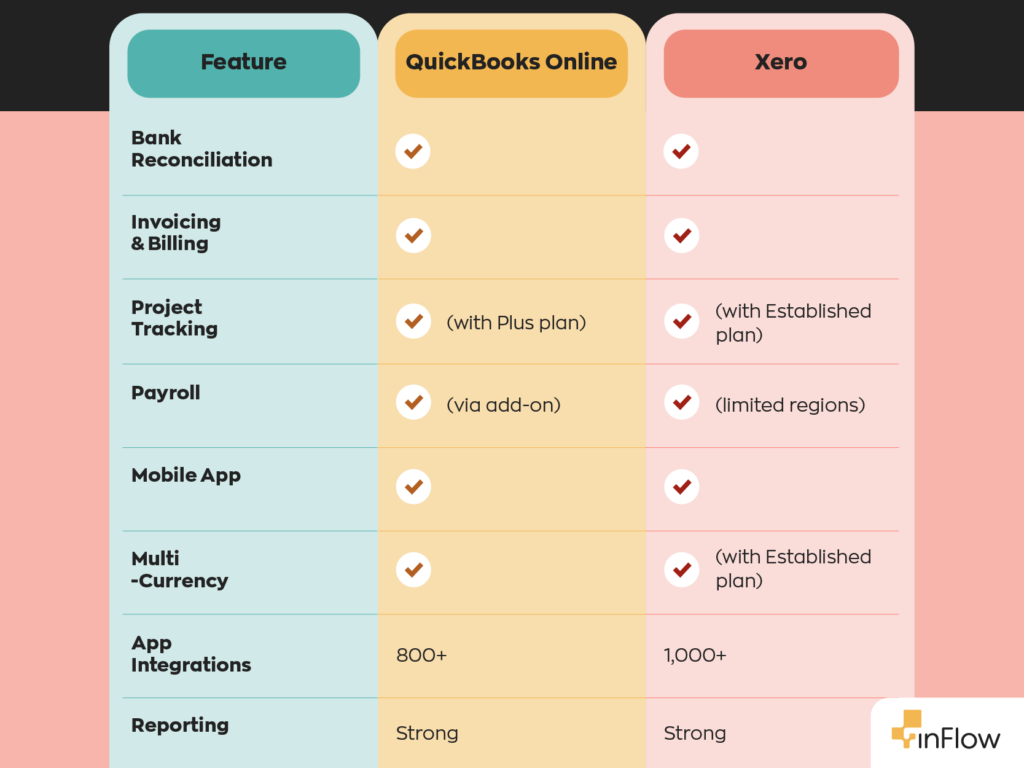
At the time of writing, QuickBooks Online offers a slightly stronger feature set. Something to note here is that both Xero and QuickBooks Online are software as a service (SaaS) companies, which means they require a recurring (usually monthly or annual) fee to use them. Both solutions also have more than one subscription plan available, with the more expensive plans having slightly more functionality.
Before establishing QuickBooks Online, Intuit did offer a local application called QuickBooks Desktop. Unlike QuickBooks Online, QuickBooks Desktop was a local-only platform. However, relatively recently, Intuit has announced it’ll be sunsetting QuickBooks Desktop 2020. So it seems it’s only a matter of time before the software is entirely cloud-based.
Invoicing & billing limits
Of particular note is the difference in invoicing and billing. QuickBooks Online offers unlimited invoicing and billing on any of its main U.S. plans. allows up to 20 invoices or quotes and up to 5 bills per month, while Growing and Established remove those limits. If app partners create transactions on your behalf, those can also count toward Xero Early’s invoice limit.
If you think you can get away with only sending 20 invoices a month, go for it. If not, you’ll have to consider QuickBooks Online or upgrading to your Xero plan, which doesn’t have an invoice limit.
Number of users
There’s several reasons the QuickBooks Online vs Xero debate rages on. One of the biggest is the number of users that each platform supports. In this context, “user” refers to someone who can access and modify recorded information. In other words, accountants.
The number of users you can register for QuickBooks Online depends on your plan. It ranges from 1 to 25 users. Xero, on the other hand, offers an unlimited number of users for any of its plans. This has helped Xero carve out a place as a QuickBooks Online alternative for businesses that require multiple employees’ access to the platform.
Price point
Another reason, unsurprisingly, is cost. At regular U.S. list prices, QuickBooks Online currently ranges from $38/month for Simple Start to $275/month for Advanced. Xero’s U.S. plans currently range from $25/month for Early to $90/month for Established, before promotional discounts.
Xero offers transparent pricing with few unexpected add-ons, while some users have said that QuickBooks Online’s pricing is much more complex.
User interface
A third, more nebulous reason, is ease of use. Intuit released QuickBooks Online in 2001, five years earlier than Xero. In the grand scheme of things, five years isn’t all that long, but when it comes to software development, it’s quite some time.
Being one of the first of its kind, Intuit had to innovate as it went along. Xero, on the other hand, was able to observe what factors led to its success before developing its own product. This is also reflected in user comments regarding their UI. While both platforms have customizable dashboards, the common sentiment is that Xero’s is much easier to understand.
Customer support
Another thing to consider is the customer support offered by both services. QuickBooks Online vs Xero has a different approach. QuickBooks Online provides live support, although their availability depends on the plan. Xero has a different system similar to support tickets, where users leave a message and wait for a reply. Regardless of which one sounds more ideal, we recommend looking into user reviews to get a better picture.
Integrations
These days, businesses use a wide range of software solutions for different areas of their business, and it’s vital that those programs can talk to one another. Otherwise, it takes a lot of time to manually move data between programs—that’s where integrations come in.
While QuickBooks Online offers more than 800 integrations, Xero offers over 1,000. Depending on what software you already use, Xero may be a more appealing alternative to QuickBooks Online.
Where both Xero and QuickBooks Online fall short
While both Xero and QuickBooks Online offer basic inventory tracking, neither platform was built with inventory management in mind, and it shows. You’ll quickly hit limitations if you need barcodes, bill of materials, or multi-location inventory tracking, to name just a few.
Software like inFlow was custom-built for inventory management and excels in all the areas where these two fall short. And the best part is our software has integrations with both Xero and QuickBooks Online. So no matter which accounting software you choose, inFlow has you covered.
FAQ
Which is better for small businesses, Xero or QuickBooks Online?
It depends on your priorities. QuickBooks Online is the stronger choice if you need advanced reporting, cash flow forecasting, or U.S.-based payroll. Xero tends to win on ease of use, transparent pricing, and unlimited user access across all plans. For businesses outside North America, Xero is often the more natural fit. Either way, neither platform handles complex inventory well on its own.
How do Xero and QuickBooks Online compare on pricing?
Xero’s U.S. plans range from $25/month (Early) to $90/month (Established). QuickBooks Online ranges from $38/month (Simple Start) to $275/month (Advanced). Xero is generally the more affordable option, especially for teams that need multiple users, since Xero includes unlimited users on every plan, while QuickBooks Online charges more as your user count grows.
What are the pros and cons of Xero vs QuickBooks Online?
QuickBooks Online pros: stronger reporting, cash flow tools, and wider U.S. accountant familiarity. Cons: higher cost, user limits per plan. Xero pros: unlimited users, cleaner interface, lower price point, and 1,000+ integrations. Cons: limited invoice volume on the entry-level plan, and customer support runs on a ticket-based system rather than live chat. Both have solid core accounting features.
How do Xero and QuickBooks Online compare on integrations?
Xero connects with over 1,000 third-party apps, while QuickBooks Online supports 800+. Both cover the major categories: payments, payroll, CRM, and inventory. If you’re already using a specific tool, it’s worth checking both marketplaces before committing. Inventory management software like inFlow integrates with both platforms, so you won’t have to choose one over the other just to keep your systems connected.
Which platform is more scalable, Xero or QuickBooks Online?
QuickBooks Online scales well for U.S.-based businesses that need detailed financial reporting and forecasting as they grow. Xero scales better for teams that are expanding headcount, since unlimited users are included at every tier. For businesses with increasingly complex inventory, however, both platforms will eventually hit their limits. That’s where dedicated inventory software becomes essential.
Can I track inventory in QuickBooks Online or Xero?
Both platforms offer basic inventory tracking, but neither was purpose-built for it. You won’t find features like barcode scanning, bill of materials, or multi-location tracking in either tool. If inventory is a core part of your business, you’ll get much further with dedicated inventory management software that integrates directly with whichever accounting platform you choose.
How easy is it to switch from QuickBooks Online to Xero (or vice versa)?
Switching is doable, but it does require some planning. You’ll need to export your chart of accounts, customer and vendor lists, and historical transaction data, then map everything into the new platform. Most businesses find the transition takes a few days to a few weeks, depending on the volume of data. If you’re also using inventory software, check that it supports both platforms before making the switch.
0 Comments