 Fellow Canadians: All inFlow plans are available in Canadian dollars






Key takeaways
- Computer vision utilizes AI-powered cameras and image recognition software to automatically monitor inventory levels, track product movements, and identify discrepancies in real-time.
- Companies like Amazon and Walmart have already begun adopting computer vision technology to predict stockouts, reduce excess inventory, and implement just-in-time inventory management.
- Implementing computer vision requires high-resolution cameras with wide-angle lenses, machine learning algorithms trained on extensive footage, and integration with existing inventory management systems.
- A robust barcoding system is essential for computer vision to accurately identify and track products.
- Computer vision technology is becoming more affordable and accessible, allowing businesses of various sizes to automate inventory monitoring, reduce labor costs, and improve customer satisfaction.
The logistics world has seen many innovations over the years, from barcodes to RFIDs and beyond. And now, in the modern world of AI, we’re seeing something new emerge: computer vision for inventory monitoring. Computer vision relies on cameras and image recognition software to track product movement through warehouses and distribution centers. These AI systems can identify products, read labels, and get a real-time inventory count.
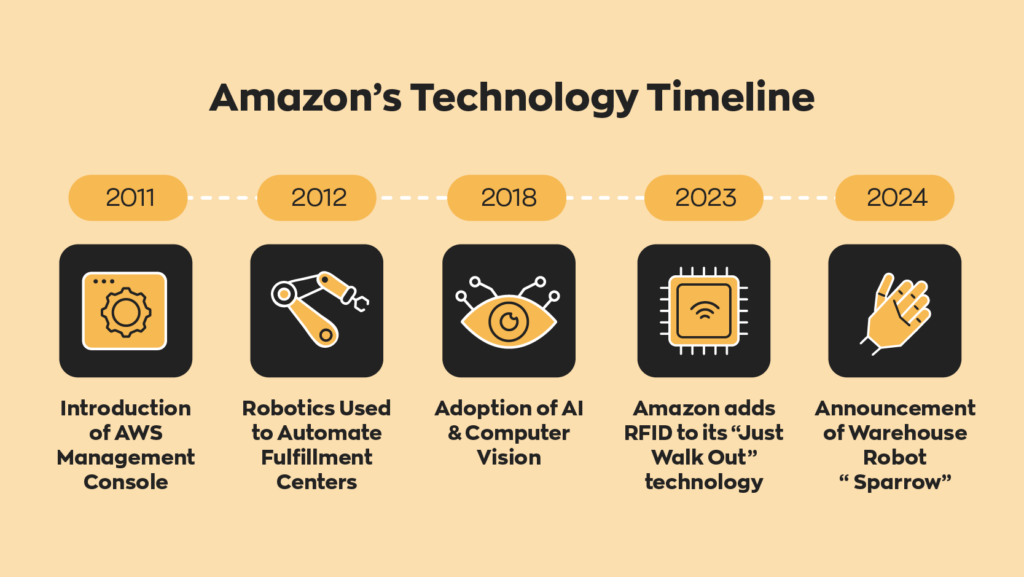
Some companies have already shifted from manual inventory control to systems run with the help of computer vision technology. For example, Amazon began exploring computer vision to improve logistics in the early 2010s. This technology lets them see likely stockouts before they occur, find differences between their inventory counts and actual levels on the shelves, cut back excess stock, and even use just-in-time inventory management.
What is computer vision in inventory monitoring?
Computer vision is a technology that uses cameras, image recognition, and artificial intelligence (AI) to automatically monitor inventory. Instead of relying on manual counts, computer vision systems aim to automate inventory management by continuously monitoring products, shelves, and storage areas, allowing businesses to track inventory levels in real-time.
As AI technology continues to improve, many experts believe computer vision will play an increasingly important role in warehouse operations, retail environments, and supply chain management. So it should come as no surprise that Amazon is leading the charge in adoption.
How computer vision tracks stock and product movements
Computer vision systems use cameras to capture images or video of inventory throughout the day. AI-powered image recognition software then identifies products and detects changes as items are moved, received, picked, or sold.
By continuously monitoring inventory activity, these systems can:
- Track stock levels automatically
- Detect product movement and location changes
- Identify inventory trends and demand patterns
- Reduce the need for manual inventory checks
- Improve inventory accuracy and visibility
Because the process is automated, businesses can monitor thousands of products across multiple locations simultaneously.
How computer vision differs from barcodes, RFID, and manual inventory counts
Unlike barcode systems, which require workers to scan items individually, computer vision can identify products automatically without direct interaction. It also differs from RFID, which relies on tags and readers to track inventory movement.
Computer vision offers a more hands-off approach by using cameras to observe inventory as it moves through a facility. This can reduce labor requirements and provide continuous visibility instead of periodic updates from scans or manual inventory cycle counts.
That said, computer vision is often used alongside barcodes and RFID rather than replacing them entirely. Many businesses combine these technologies to improve inventory accuracy, automate routine tasks, and gain a more complete view of their operations.
How computer vision improves inventory accuracy and visibility
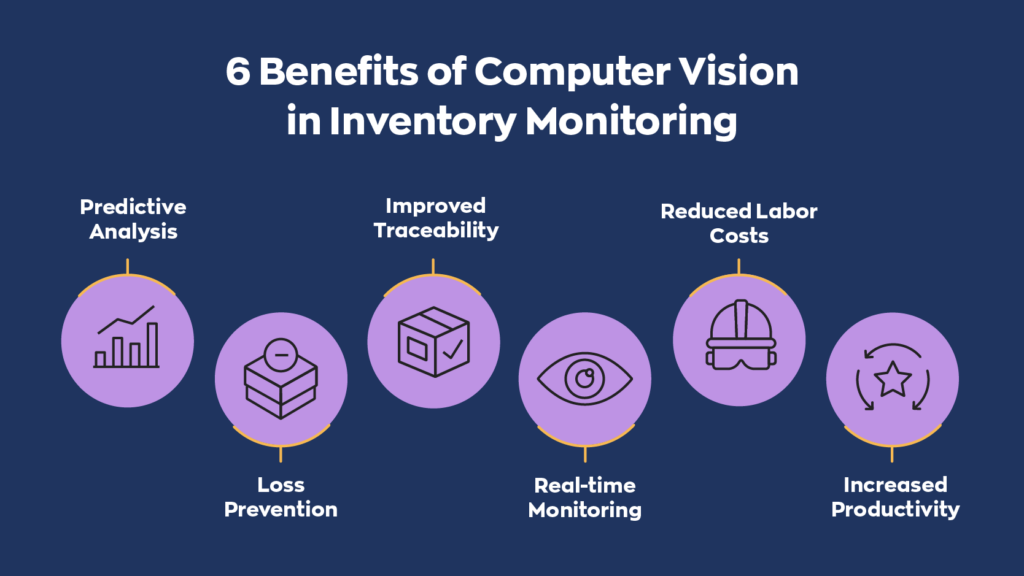
Inventory accuracy depends on knowing what you have, where it is, and when it moves. Since computer vision inventory systems monitor stock automatically in real-time, they can identify products, track movement, flag discrepancies, and give teams a clearer view of inventory across warehouses, stores, and distribution centers.
Real-time inventory visibility across locations
Computer vision systems can monitor inventory activity as it happens. Cameras placed in warehouses, stockrooms, loading docks, or retail shelves can track stock levels, product movement, and storage locations without requiring employees to scan every item.
This helps businesses see inventory across multiple locations, spot discrepancies earlier, monitor shelf or storage availability, and reduce delays caused by manual updates. For teams managing stock across several facilities, that means fewer surprises and better decisions based on current data.
Fewer stockouts, less excess stock, and faster replenishment
Better visibility leads to better replenishment. When computer vision detects that stock is running low, teams can respond sooner instead of waiting for a manual count or a delayed report.
That can help reduce stockouts, prevent overordering, speed up replenishment, and improve inventory turnover. In retail, computer vision can spot empty shelf space before customers do. In warehouses, it can identify depletion patterns and trigger reorder points before shortages slow down operations.
Better traceability, exception detection, and demand planning
Computer vision also creates a visual record of inventory activity. That makes it easier to catch issues like misplaced stock, picking errors, missing products, receiving discrepancies, unauthorized movement, or shrinkage.
Over time, the data collected by these systems can also improve demand planning. By analyzing product movement, replenishment frequency, stockouts, and seasonal trends, businesses can refine forecasts, adjust reorder points, and allocate inventory more effectively across locations.
What you need before implementation
Computer vision can automate inventory monitoring, but it isn’t a plug-and-play solution. Before investing in cameras and AI systems, businesses need accurate product identification, reliable inventory data, and software that connects everything.
Product identification and barcode foundations
Most computer vision systems work best when they are paired with existing product identification methods, particularly barcodes. Barcodes provide a unique identifier for each product, allowing the system to connect what the camera sees with the correct inventory record.
Without standardized product identification, computer vision systems may struggle to distinguish between similar items, packaging variations, or product revisions.
Barcode quality, label placement, and SKU mapping
For computer vision to work effectively, barcodes must be easy to read and consistently applied. Labels should be placed in visible locations, printed clearly, and linked to accurate SKU records within the inventory system.
Poor label quality, damaged barcodes, or inconsistent SKU mapping can reduce accuracy and create data issues that no amount of AI can fully solve.
When barcode workflows should be improved before adding vision
If a business already struggles with barcode scanning accuracy, inventory discrepancies, or inconsistent product labeling, those issues should be addressed before implementing computer vision.
Computer vision can enhance inventory visibility, but it cannot compensate for unreliable inventory data. Strong barcode processes create the foundation that computer vision builds upon.
Camera coverage, image quality, and lighting
The quality of a computer vision system depends heavily on the quality of the images it receives. Cameras must provide enough resolution to identify products, labels, and inventory movement across the areas being monitored.
Businesses should also consider camera placement, viewing angles, obstructions, and lighting conditions. Poor visibility can reduce recognition accuracy and limit the effectiveness of the system, especially in large warehouses or low-light environments.
Inventory software integration, data models, and APIs
Computer vision systems are most valuable when they can automatically update inventory records and share information with existing business systems.
This typically requires inventory management software that supports integrations through APIs, like inFlow, for example. The software must be able to receive inventory updates, match products to inventory records, and provide a consistent source of truth across the organization.
Without proper integration, computer vision becomes little more than a monitoring tool. With the right software foundation, it can become a powerful source of real-time inventory data that improves visibility, replenishment, and decision-making.
How to implement computer vision for inventory management
Successfully implementing computer vision requires more than installing cameras and AI software. Businesses need clear goals, reliable inventory data, and processes that turn detections into actionable insights.
Most successful deployments start with a specific use case, prove their value, and expand from there.
Define the scope and success metrics
Start by identifying the inventory problem you want to solve. Rather than monitoring every inventory movement, focus on a specific area such as stockouts, receiving accuracy, stock transfers, or misplaced products.
Then establish clear KPIs to measure success, such as:
- Inventory accuracy
- Stockout frequency
- Shrinkage rates
- Replenishment response times
- Labor spent on manual counts
Clear metrics make it easier to determine whether the system is delivering real operational value.
Choose camera locations and processing methods
Detection accuracy depends heavily on camera placement and image quality. Focus on areas where inventory visibility matters most, such as receiving docks, storage locations, pick zones, packing stations, or retail shelves.
You’ll also need to decide how images are processed:
- Edge processing analyzes images locally for faster response times.
- Cloud processing analyzes images remotely and often offers greater scalability.
The right approach depends on your specific requirements, infrastructure, and budget.
Train and validate the system
Computer vision models must be trained using images from real operating environments. This includes different lighting conditions, product orientations, packaging variations, and partially obstructed inventory.
Before full deployment, test the system against common challenges such as similar-looking SKUs, damaged packaging, mixed inventory locations, and changing layouts.
Connect computer vision to inventory workflows
Computer vision creates the most value when detections trigger action. For example, a low-stock alert can automatically trigger a reorder point, while detected inventory movement can update stock levels in real-time.
Many businesses integrate computer vision with inventory management software, warehouse systems, reporting tools, and purchasing workflows to reduce manual tasks.
Train staff and continuously improve
Computer vision should reduce routine work, not eliminate human oversight. Employees still need to review exceptions, investigate discrepancies, and verify unusual inventory activity.
Regular inventory audits, camera maintenance, workflow reviews, and model retraining help maintain accuracy as products, layouts, and processes change over time.
Ultimately, computer vision works best when combined with proven inventory management techniques. Barcodes, cycle counts, and standardized inventory processes remain the foundation, while computer vision adds an additional layer of automation and visibility.
Examples of computer vision in inventory operations
Computer vision may sound like Sci Fi, but it’s already being used in retail stores, warehouses, and distribution centers. While implementations vary, most applications focus on monitoring inventory, detecting exceptions, and helping teams respond faster to operational issues.
Retail shelf monitoring and stockout detection
Retailers use computer vision to monitor shelf inventory in real-time. Cameras can identify empty shelf space, low-stock products, and misplaced items without requiring employees to manually inspect every aisle.
This allows store teams to replenish products sooner, reduce stockouts, and improve product availability for customers. The same data can also help retailers analyze purchasing patterns and optimize shelf layouts.
Warehouse location verification and movement tracking
In warehouses, computer vision can track inventory as it moves through receiving, storage, picking, and shipping areas. By monitoring product movement and storage locations, businesses gain greater visibility into where inventory is located and how it flows through their business.
These systems can also help verify that products are stored in the correct locations, reducing picking errors and making inventory easier to find when needed.
Loss prevention and operational exception alerts
Computer vision can identify inventory events that may require attention, such as misplaced products, unauthorized movement, receiving discrepancies, or unusual inventory activity.
Instead of discovering these issues during audits or physical counts, businesses can receive alerts as exceptions occur. This allows teams to investigate problems sooner, reduce inventory shrinkage, and maintain more accurate inventory records.
The limits of computer vision for inventory monitoring
Computer vision can improve inventory visibility, but it isn’t a magic bullet. Real warehouses and stockrooms are messy. Products move, packaging changes, labels get covered, and shelves or storage areas become crowded.
Why inventory counting is harder than it looks
Counting inventory is more complicated than simply recognizing a product. Computer vision systems also need to identify quantities, locations, and movement accurately enough to support real decisions.
That becomes harder when products look similar, items are stacked or hidden, labels are damaged, lighting changes, or packaging is updated. As we said, it’s not a magic bullet.
Common reasons computer vision systems fail
Computer vision projects often struggle because of poor data quality, weak integrations, or inconsistent inventory processes. Common issues include poor camera placement, limited training data, similar-looking SKUs, changing layouts, inconsistent labeling, and software that doesn’t connect cleanly with inventory records.
While the technology has incredible potential, it still requires a good amount of setup and maintenance to ensure it runs smoothly. These systems are not a simple set-it-and-forget-it situation.
What the Starbucks inventory AI project teaches businesses
Starbucks offers a useful cautionary example. The company discontinued an AI inventory counting system less than a year after rolling it out across North American stores after reports that it misidentified products, missed inventory, and created extra work for employees.
The lesson isn’t that computer vision doesn’t work. It’s that businesses should start small, test accuracy in real operating conditions, and use computer vision to support proven inventory processes, not replace them entirely.
Is computer vision right for your inventory workflow?
Computer vision can improve inventory visibility and automate routine monitoring, but it’s not the right fit for every business. Before making the investment, it’s worth asking whether the problem actually requires AI computer vision in the first place.
In many cases, improving existing inventory processes can deliver better results for a fraction of the cost.
Best-fit use cases for SMB warehouses and supply chains
Computer vision tends to work best in environments with high inventory volume, frequent product movement, and limited visibility.
You may benefit from computer vision if you:
- Manage inventory across multiple locations
- Operate a high-volume warehouse or distribution center
- Regularly deal with stockouts or replenishment delays
- Spend significant time on manual inventory monitoring
The most successful projects usually start with a single use case, such as monitoring receiving accuracy, tracking inventory movement, or detecting stockouts.
Cost, complexity, and maintenance tradeoffs
Computer vision requires more than a few cameras and a software subscription. Hardware, integrations, implementation, training, and ongoing maintenance can add up pretty quickly.
Accuracy can also be affected by changes in layout, new packaging, poor lighting, or similar-looking products. As a result, most systems require ongoing testing and adjustment to maintain performance.
When barcodes and process improvements are the better first step
Many inventory problems aren’t caused by a lack of AI. They’re caused by inconsistent processes. For most SMBs, the biggest gains come from getting the fundamentals right first:
- Barcode-based inventory tracking
- Standardized processes for shipping and receiving
- Regular cycle counts
- Accurate SKU data
- Consistent inventory audits
These practices improve inventory accuracy on their own and create the reliable data that computer vision systems depend on. If your inventory records aren’t trustworthy, then adding AI into the mix won’t do you any good.
Wrapping up
To sum up, the future has arrived, and computer vision is revolutionizing warehouse management software as well as the management of supply chains and inventory. Through computer vision and AI, companies can automate the monitoring of their inventory, significantly increasing their efficiency and cutting down on costs and waste.
This cutting-edge technology lets companies obtain accurate, real-time information about their stock, helping them decide what to have on hand to meet demand. With computer vision, tomorrow’s supply chain will be leaner, faster, and more efficient.
Adopting this technology will give companies an operational advantage and a better chance of winning over customers. Computer vision is already starting to revolutionize the efficiency and productivity of inventory management, and things will only get more sophisticated. The future is automated, data-driven, and AI-powered.
0 Comments